
Download Blocked by Microsoft Defender SmartScreen?
After downloading OGCS, if it’s been released recently, you may be faced with an alert below when attempting to run the installer or the portable application executable.
🔐 It can be resolved safely! See below for guidance
It just takes time for each new release to build reputation with Microsoft before the warning is removed.
Browser Download Blocked
Your organisation may prevent you from being able to keep files that are “not commonly downloaded”:-
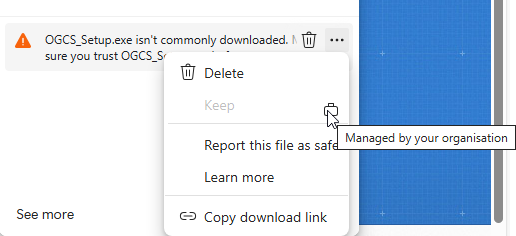
See workaround 
Download via PowerShell
Until enough reputation has been built to convince your organisation, try:-
- Click “Start” and “Run” (or
Win+R) and typepowershell - In the console, copy and paste the below:-
(New-Object System.Net.WebClient).DownloadFile((read-host "Paste in the download link"), "$ENV:USERPROFILE\Downloads\") - Right-click the link on the webpage for the file you previously downloaded and “Copy link address”. Paste it into the Powershell window and press
enter
Eg: https://github.com/phw198/OutlookGoogleCalendarSync/releases/download/v3.0.1-alpha/OGCS_Setup.exe - Locate the file in your
Downloadsfolder and run as normal.
Unblocking SmartScreen
SmartScreen may still block a successfully downloaded file:-
See workaround for the installer
Unblocking the downloaded installer:-
-
For
OGCS_Setup.exeyou may be able to simply clickMore infoand thenRun Anyway
🔐 You can confirm the file is authentic and safe as it will show the publishers name
- If not, right-click the
OGCS_Setup.exefile and selectProperties -
In the bottom right hand corner, click the
Unblockcheckbox and thenOK.
🔐 Again, you can confirm the file is authentic and safe as it will have been “signed” by the developer
- Execute
OGCS_Setup.exe
See workaround for the portable zip
Unblocking the downloaded portable zip:-
- After extracting the zip file contents, right-click the
OutlookGoogleCalendarSync.exefile, selectPropertiesand then checkUnblockas per the images in the above installer section -
If there is still a problem, try unblocking all the extracted files. The fastest way to achieve this is:-
-
Winkey+Rand typepowershell - Change directory to the extracted files
cd C:\my\extracted\files\directory Get-ChildItem | Unblock-File- Now run OGCS by double clicking the executable.
-